

How to Apply for a Saudi Tourist Visa Online

The Riyadh skyline at sunset, Saudi Arabia
Before you meet the Saudi skies, getting your visa is the first step.
Thankfully, Visit Saudi has made that process seamless for everyone. Through their online portal, international visitors can easily apply for a tourist visa on their own. The official gateway for applications is the Visit Saudi website: https://visa.visitsaudi.com
Types of Saudi Tourist Visa
There are two main ways to get a tourist visa. In addition, travelers passing through the Kingdom can apply for a Transit Visa if they are making a stopover.
1. eVisa (online in advance)
Apply through the official Visit Saudi eVisa portal
One-year multiple entry
Up to a 90-day stay per visit
2. Visa on Arrival
Available at Saudi airports and entry points
Use self-service kiosks or go directly to passport control
Same validity: one year, multiple entry, up to a 90-day stay per visit
Transit Visa (Stopovers)
If you’re just passing through Saudi Arabia, you can apply for a Transit Visa.
This visa allows a short stay (usually up to 96 hours) while in transit
It can be arranged through your airline booking (e.g., Saudia or Flynas) or via the Ministry of Foreign Affairs
Ideal if you have a long layover and want to explore before continuing your journey
Tourist Visa Uses in Saudi Arabia: Cultural and Religious Access
Beyond just entry, a tourist visa also opens the door to unique cultural and religious experiences across Saudi Arabia.
Tourist visas are valid for visiting family, attending cultural/religious events, or exploring historic Islamic sites across Saudi Arabia
Any tourist visa allows you to perform Umrah at any time of the year but not Hajj, which requires a separate visa
For Umrah, don’t forget to book your appointment through the official Nusuk platform
Eligible Countries for the Saudi Tourist Visa
Citizens of 66 countries can apply for a Saudi eVisa or obtain a Saudi visa on arrival.
Regional Breakdown
-
Mauritius, Seychelles, South Africa
-
Azerbaijan, Brunei, China (including Hong Kong and Macau), Japan, Kazakhstan, Kyrgyzstan, Malaysia, Maldives, Singapore, South Korea, Tajikistan, Thailand, Turkey, Uzbekistan
-
Albania, Andorra, Austria, Belgium, Bulgaria, Croatia, Cyprus, Czech Republic, Denmark, Estonia, Finland, France, Georgia, Germany, Greece, Netherlands, Hungary, Iceland, Ireland, Italy, Latvia, Liechtenstein, Lithuania, Luxembourg, Malta, Monaco, Montenegro, Norway, Poland, Portugal, Romania, Russia, San Marino, Slovakia, Slovenia, Spain, Sweden, Switzerland, Ukraine, United Kingdom
-
Bahamas, Barbados, Canada, Grenada, Panama, Saint Kitts and Nevis, United States
-
Australia, New Zealand
If your country is not on the list above, contact the nearest Saudi embassy for instructions
Please note that the list of eligible countries may change over time. For the most up-to-date information, check the official Visit Saudi visa regulations page
Saudi Tourist Visa Costs & Validity (Example)
The following costs are provided as an example. For instance, Italian citizens are eligible for both Saudi eVisa and Saudi Visa on Arrival, with the below pricing applying to them.
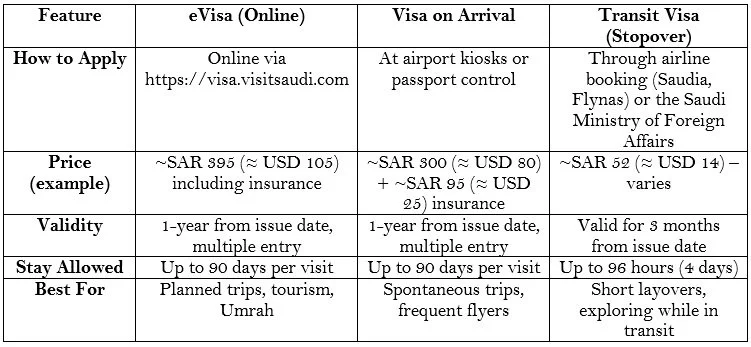
The costs may vary depending on citizenship. Always check the official Visit Saudi eVisa portal for the latest updates
General Requirements for a Saudi Tourist Visa
You must be at 18 years old to travel alone
Travelers under 18 must be accompanied by a parent, grandparent, or adult sibling
Your passport must be valid for at least 6 months beyond the entry date. (Exception: U.S. citizens can enter as long as their passport is valid, regardless of the time remaining)
Step-by-Step Guide: How to Apply for a Saudi Tourist eVisa
Step 1: Visit the Official Saudi eVisa Portal
Go to: https://visa.visitsaudi.com
Click on Apply Now
Step 2: Create an Account
Register with your email and set up a password
Verify your account via the confirmation email
Step 3: Start a New Application
Log in and select Tourism eVisa
Enter your personal details: full name, passport number, nationality, and travel information
Step 4: Upload Your Documents
Upload a recent passport-sized photo
Upload a copy of your passport (valid for at least 6 months)
Step 5: Pay the Visa Fee
Pay securely online with a credit or debit card
Step 6: Receive Your Saudi eVisa
Processing usually takes a few minutes to several hours
You’ll receive your eVisa by email as a PDF
Step 7: Travel to Saudi Arabia
Print your eVisa and keep a digital copy on your phone
Present it at immigration upon arrival
View the step-by-step ‘How to Apply to eVisa’ guide, by Visit Saudi
Saudi Tourist Visa FAQs
For answers to the most common questions about the Saudi Tourist Visa, visit the official Visit Saudi visa regulations page
You can also contact Visit Saudi directly through their official contact page – from personal experience, they are very responsive.
Final Thoughts on The Saudi Tourist Visa
Applying for a Saudi Tourist Visa is now quick and straightforward. Whether you choose the Saudi eVisa or the Saudi Visa on Arrival, the process takes only a few minutes.
Start your journey today at the official Visit Saudi eVisa portal
Side note: I once pitched the idea of introducing a visa “voucher” — like a gift card to pay the visa fees for someone else — and the Visit Saudi support team said they would pass it on to the department. Hopefully one day it becomes a reality!